TOP 3 WAYS TO DISABLE USB PORTS IN WINDOWS XP, 7
There are many ways to prevent access or Disable USB ports. So many third party softwares available on Market available like free wares, sharewares and premium services.
 Simple way is Right Click on My Computer and Go to Mange, point to device manager and find the "Universal Serial Bus Controllers" and expand it by clicking on '+' and disable the USB Root Hub's and just finished. USB ports disabled, but this way is known by so many and any one can do in this way.
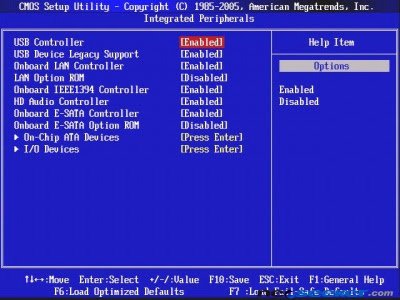
Other way is to disable USB ports is using BIOS, After powering on the PC, Go to BIOS by hitting 'Del' or 'F2' or appropriate key as assigned to the your motherboard, you may find on first screen or refer Motherboard manual.find the system information tab (this type of feature may vary with different motherboards) then check for USB ports option, if not found go to advanced tabs, here you will find the USB ports option and one more is USB speed, change the USB ports option to disable(by default this is enabled) and press F10 and select 'yes' to save the changes to BIOS. When desktop appears, try inserting the USB drive, it won't works. This is the way any one do follows, who is some moderate at computers or by following Mother Manual or Researching for this on Internet.

And this is other method but be careful while with Registry Editor or take a back up before making any changes to Registry and follow these steps (follow below steps at your own risk)

Other way is to disable USB ports is using BIOS, After powering on the PC, Go to BIOS by hitting 'Del' or 'F2' or appropriate key as assigned to the your motherboard, you may find on first screen or refer Motherboard manual.find the system information tab (this type of feature may vary with different motherboards) then check for USB ports option, if not found go to advanced tabs, here you will find the USB ports option and one more is USB speed, change the USB ports option to disable(by default this is enabled) and press F10 and select 'yes' to save the changes to BIOS. When desktop appears, try inserting the USB drive, it won't works. This is the way any one do follows, who is some moderate at computers or by following Mother Manual or Researching for this on Internet.

1. Click Start, and then click Run.
2. In the Open box, type regedit, and then click OK.
3. Locate, and then click the following registry key:
HKEY_LOCAL_MACHINE\SYSTEM\CurrentControlSet\
Services\UsbStor
4. In the right pane, double-click Start.
5. In the Value data box, type 4, click Hexadecimal
(if it is not already selected), and then click OK.
6. Quit Registry Editor.
To re-enable a disabled port:
1. Click Start, and then click Run.
2. In the Open box, type regedit, and then click OK.
3. Locate, and then click the following registry key:
HKEY_LOCAL_MACHINE\SYSTEM\CurrentControlSet\
Services\UsbStor
4. In the right pane, double-click Start.
5. In the Value data box, type 3, click Hexadecimal
(if it is not already selected), and then click OK.
6. Quit Registry Editor.
After doing steps for re enabling, if usb drive not detected you need to restart PC and try again.


