Showing posts with label pci. Show all posts

Friday, May 10, 2013

Ethernet cable not working?

2 comments

I recently built a computer (windows 7), and connected an Ethernet cable to it through a router. I have another computer that works fine with any of the Ethernet cables, but when I try to connect it to the new computer nothing is recognized. What am I doing wrong?
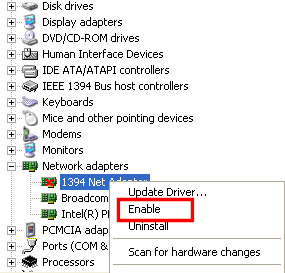
device manager enable lan card

You are connecting the ethernet cable to the Lan port and where you are connecting to on board LAN or the LAN card which is inserted in PCI slot.

If you are connecting to the onboard LAN, there might be problem with the LAN cable, try to insert the same lan cable to the other computer and if that not works problem with the cable, try a different cable.

If you are connecting to LAN card, check whether the lan card inserted into PCI slot correctly or not and insert the LAN cable and install the latest drivers, download from the official website.

One more thing, may the LAN card is disabled in the device manager and once check with the device manager if disabled and enable it. Install the correct drivers for you lan card then only it works perfect.
Read more...

Friday, April 19, 2013

Nothing happens after installing the driver?

0 comments

I install the Ethernet driver and It still doesn't show up in device manager. What could it be? Do I have to install something else first? What do I need to at least make internet work with the cable? I did reboot. I need Ethernet controller, Network controller and PCI device.

netowrk card nic

Did you check the Bios settings because some motherboards have the option to disable on board devices and is the Ethernet card is on board or you have inserted a LAN card in PCI slot. Once check if you are using the on board device please check the bios settings if disabled please enable it, so it will be shown when you boot up like new hardware found if you installed the drivers already it find outs the appropriate drivers and installs them.

And one more thing is if didn't installed the drivers of any device, it will shown in device manager. If you have installed LAN card try the same LAN card in other system and install the drivers if it shown and drivers successfully installed check in the device manager and if it shown, may be the problem in your PCI slots might be they are not working, once clean them with blower and try it, mostly not works and depends on your Luck.
Read more...

Tuesday, September 25, 2012

The ports on back side of cpu of my desktop computer suddenly don't work - why?

0 comments

Okay in my computer there are four usb ports back side and 2 in front while small point like port for earphone and lan port are on back side and small point like ports which colored red and green etc are in front too but those earphones port don't work either on back or front that too suddenly and four usb port of back side stopped working and if I attach mouse and keyboard to those back side port then it don't work so I have to attach mouse and keyboard in front side 2 usb ports. While there are not more than 2 ports in front so I can't attach pendrive or speakers. And LAN too seems to be working with great difficulty and its disconnecting often. I just bought new PC one month ago. Just once my brother switched off directly without shutting down and after restarting I found ports stopped working. But in my old PC we often switched off without shutting down and even in our office we do it often but never seen such problem

Why this happened to my new computer. Now that vendor will ask lot of money for repair as ports don't cover under warranty. How to fix this?

Sol :- there may be when switching off the system directly, there may be the chipset fails (most cases not) and may the bios settings by manually or the usb ports disabled in the os

1. go to bios and after switch on the computer, go to bios by pressing appropriate button (del or F2...etc) just select resotre to defaults and press F10 and press Y and then enter and boot on just once try if not

2. May be the chipset failure, this happens in rare cases of PC's if failed may not be repaired or you may need a USB Card where you can place it on PCI slot and use it 

3. Once Check with device manager, right click on my computer and goto manage next goto device manager and check usb ports and if disabled and make it enable by right clicking and choosing the enable option.
device manager windows
Comments are welcome.
Read more...


Technology In Life Copyright © 2013 Minima Template
Designed by BTDesigner Published..Blogger Templates · Powered by Blogger