Showing posts with label lan card. Show all posts

Friday, May 10, 2013

Ethernet cable not working?

2 comments

I recently built a computer (windows 7), and connected an Ethernet cable to it through a router. I have another computer that works fine with any of the Ethernet cables, but when I try to connect it to the new computer nothing is recognized. What am I doing wrong?
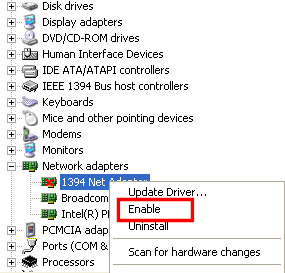
device manager enable lan card

You are connecting the ethernet cable to the Lan port and where you are connecting to on board LAN or the LAN card which is inserted in PCI slot.

If you are connecting to the onboard LAN, there might be problem with the LAN cable, try to insert the same lan cable to the other computer and if that not works problem with the cable, try a different cable.

If you are connecting to LAN card, check whether the lan card inserted into PCI slot correctly or not and insert the LAN cable and install the latest drivers, download from the official website.

One more thing, may the LAN card is disabled in the device manager and once check with the device manager if disabled and enable it. Install the correct drivers for you lan card then only it works perfect.
Read more...

Friday, April 19, 2013

Nothing happens after installing the driver?

0 comments

I install the Ethernet driver and It still doesn't show up in device manager. What could it be? Do I have to install something else first? What do I need to at least make internet work with the cable? I did reboot. I need Ethernet controller, Network controller and PCI device.

netowrk card nic

Did you check the Bios settings because some motherboards have the option to disable on board devices and is the Ethernet card is on board or you have inserted a LAN card in PCI slot. Once check if you are using the on board device please check the bios settings if disabled please enable it, so it will be shown when you boot up like new hardware found if you installed the drivers already it find outs the appropriate drivers and installs them.

And one more thing is if didn't installed the drivers of any device, it will shown in device manager. If you have installed LAN card try the same LAN card in other system and install the drivers if it shown and drivers successfully installed check in the device manager and if it shown, may be the problem in your PCI slots might be they are not working, once clean them with blower and try it, mostly not works and depends on your Luck.
Read more...


Technology In Life Copyright © 2013 Minima Template
Designed by BTDesigner Published..Blogger Templates · Powered by Blogger