Showing posts with label drivers. Show all posts

Tuesday, August 6, 2013

Why can't I get a strong Wi-Fi connection in my room?

0 comments

My room is about 50 feet away from the router, which I don't think is too far. I get weak connections on my laptop and my phone, while some of my friends bring laptops over and get good connection. Is this a problem with my router or my laptop's network adapter? I have a Belkin N450 if that helps.When I mean connection, I mean bars. I usually get 2-3 bars in my rooms while my friends can get 5 bars. And how does an airport work?

wifi signal good bad
It depends on the WIfi card you are using may be your wireless card is not an 'N' based chip that's why the difference.


May the wireless card got problem you may contact service centre for further details. After checking with your friends connection as it seems the problem of your wireless card only. There are about some types of wireless cards like b/g/n.


Once check whether you have installed the correct drivers or any firewall is limiting the access to the wireless networks. If you do not have correct drivers installed once go to official website of you main board manufacture and download them after installing once check with them.


some wireless cards with inbuilt will get defect on board, may be that is the one of yours, it occurs very rarely
Read more...

Tuesday, May 14, 2013

Wifi connected but no internet access? but other devices works?

0 comments

My WIFI router connects with my laptop and says signal strength is strong but says no internet access. At the same time when router is connected with other system or mobile it works fine. I tried the same starting my laptop in safe mode, same problem. What should be the problem.

wifi devices router

May be the problem refers to the laptop, where the WIFI drivers does not have correct drivers installed and once check with the drivers and download the latest drivers from the official website.

There might be limited access to internet users, like router was allowed to connected only 2 devices at a time or router was filtered with connections, check whether you might have given your other device mac address and your mobile mac address. There might be problem with them, if you have filtered like this you need to off the filter and but don't create like Open network.

If you changed the settings to normal and restored defaults settings in the router, if the same problem persists you need to hard reset the router once and if you don't know about that refer the router manual.

One more thing is connect your laptop through LAN, if the internet is connected and if every thing working fine you need to check with the wifi drivers, the drivers are the problem.

Maintain a security key like WPA/WPA2 key, for internet access.
Read more...

Friday, May 10, 2013

Ethernet cable not working?

2 comments

I recently built a computer (windows 7), and connected an Ethernet cable to it through a router. I have another computer that works fine with any of the Ethernet cables, but when I try to connect it to the new computer nothing is recognized. What am I doing wrong?

device manager enable lan card

You are connecting the ethernet cable to the Lan port and where you are connecting to on board LAN or the LAN card which is inserted in PCI slot.

If you are connecting to the onboard LAN, there might be problem with the LAN cable, try to insert the same lan cable to the other computer and if that not works problem with the cable, try a different cable.

If you are connecting to LAN card, check whether the lan card inserted into PCI slot correctly or not and insert the LAN cable and install the latest drivers, download from the official website.

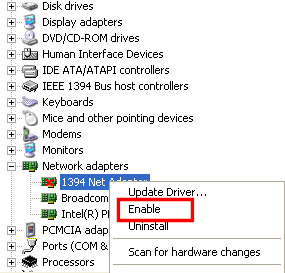
One more thing, may the LAN card is disabled in the device manager and once check with the device manager if disabled and enable it. Install the correct drivers for you lan card then only it works perfect.
Read more...

Wednesday, May 8, 2013

How do I copy a driver to another computer?

0 comments

Hello, I got a Desktop and I turn it on and it says insert CD. I don't have it but I have the driver downloaded on my other computer. How do I copy it to the computer that's not working. Please explain this thoroughly as I am new to this. Also Any tips?

If you want to copy them, in my view there is no option to copy it and may be other third party software's available.

Try this Link 

copy driver to another computer

Your Computer says insert CD, what type of CD is it asking it will show any label information or it will ask for the files like sys, inf...etc. Check correctly which type of file it is asking. If it is asking to insert appropriate operating system disc, checks all the necessary files in cd and grabs that file and if asking for a drivers cd, insert it and it copies the required files to run the drivers.

If your desktop is not showing any labels or anything and its just asking for the file, you need to know that what type of file it is asking if it is a DLL, sys, inf and any other they might be important to run that particular drivers. If you need what type of file and what it is useful for. just Google it you will come to know all the details.

But ensure that download the latest drivers and install them on your system and you will get the better performance of the system.

Always try to download the drivers from the official website because they don't contain any viruses and will have the latest fixes aswell. Update Bios for better performance but at your own risk and follow the instruction correctly before going to update.
Read more...

Thursday, April 25, 2013

I can Detect my WIFI but I can't connect to it?

0 comments

I can detect my WIFI and I know the password but still I can't connect and on my previous operating system I can connect to any WIFI but just today I formatted it with windows xp sp3 and activated it I can't connect to a single WIFI connection with or without passwords please help this is gonna be a lot of trouble if my laptop can't connect to WIFI, you know if you are programming inside the school well nvm that just plsss help me!!

wifi not connected


After formatting and install of windows did you installed the drivers of the WIFI, first you need to check whether the drivers installed in your latptop. If already installed you need to check in device manager whether it showing the "?" or anything if everything al right, OK that fine the drivers are installed in your laptop. 

Try downloading the latest drivers from your Laptop manufacturer's website and uninstall the previous drivers, install the latest drivers. If you don't about these things please contact system administrator or the laptop service centre.

One more option is there in the BIOS, in some bios version there is options like disable the USB ports, LAN cards and WIFI ports. Once check in your laptop bios whether they may be disabled, if that does enable them. If you don't know about the bios, don't try to change the settings that might cause big problem to the system performance. Contact the system administrator or refer the manual of Laptop.

If all the things above mentioned are perfect in you Laptop, try connecting the same WIFI to a different laptop or mobile, If that works your laptop seems to be get serviced visit service centre.
Read more...

Tuesday, March 26, 2013

Computer will not go to the proper print place on the printer, instead it goes to fax. How do I change the pro?

0 comments

Go to the control panel and click on printers, there check how many printers are installed. If you are right that displayed printers are installed by you. One more thing that you might need to check the latest drivers installed for the printer.

printer spool

After check whether which one you want to be the default printer. Right click on it and set as a default printer. After setting print a test page once, by going to properties of the printer and check in the tabs then given a test print.

After open the document which you want to be print, go to file and click on print or press ctrl + p. Choose the printers from the drop down menu from which printer you want to get the print. After choosing check the print from which printer it was came.

If you drivers are correct and your selection of printer is perfect you will get the printer from the exact printer. If the printer is in network place, check with the administrator for the rights. If not in a network place might be problem in your PC.
Read more...

Wednesday, March 6, 2013

I used Driver Scanner to update 7 of my drivers and computer is running slow. Should I go back to restore?

0 comments

I had a used the paid version of Driver Scanner 2013. It updated 7 of my drivers. It is made by uniblue.com. I am not sure if this have anything to do with it, but when I changed my windows password the next day, the password did not work. I had to have Staple's reset the windows password. I use Advanced System Care Ultimate 6 and ran all the programs to keep my computer fast and virus free. Please let me know if I should go back to the restore point? Will that mess anything up? Please help.

I checked with a windows tuner and it said my computer is running at 94%.

windows 7 os

My Suggestion is don't use any 3rd party software's to update your system drivers, in my view it download the drivers from other websites or any third party websites, for example say that your mother board is ASUS so in this case it downloads drivers from other third party sites, not from official site (ASUS). If you do the same there might problem with registry entries or signature files, if they mismatch with your system drivers wont work correctly.

Advanced system care ultimate, this is the software a new word to me, I didn't hear about this. As I dont know whether it is good one or bad one, may take some time to review it. Best use the popular internet security softwares or all in one softwares. 

If you have mentioned model of your motherboard, I can give you the link. Any way you can down the latest motherboard drivers from the manufacturer's website. dont forget to defragment your hard drive once or twice in a month, If you done with this, you will find the difference in performance of your PC
Read more...

Thursday, January 17, 2013

Why does my internet turn off randomly and how do I fix it?

0 comments

There's not really a certain amount time that it works for before disconnecting, it just does it randomly. When I restart the computer it works again, but it's really inconvenient sometimes and I'd like to know what's wrong with it and how I can fix it.

internet turn off

Automatically you internet is disconnecting it means that there might be number of reasons for this problem. You need to check with your cable connection whether it is inserted correctly or not and you might need to know lan card has the latest drivers installed in OS, drivers also matters here. May be your system is infected with some kind of viruses or trojans and better install a good antivirus programme as well.

If your PC is infected with virus install good internet security, if you cant afford one download a trial version of your softwares.

Check for the latest drivers according to your motherboard find them from yout motherboard manufacturer's site download and install them.

Read more...

Thursday, December 13, 2012

Dell Precision M6400 Video Card problems.?

0 comments

Dell Precision M6400 laptop having trouble with it. The video card was a 512MB is suddenly not working and showing up as a 'Standard VGA graphics card' when looking at the properties through device manager. Driver says it's up to date etc and overall at a loss on what to do!

Dell workstation laptops


Sol:-  Dell Precision M6400 is a workstation, I think you got a drivers CD, you need to install from it.
The cd consists of total drivers, which should be installed after installing OS. They provide the drivers for all OS (Windows, Mac, Linux..etc) Just run auto setup that is feature given in the drivers CD

And if the drivers not installed fro autorun, you need to install it from device manager, in which that is a lenghty process...
Read more...


Technology In Life Copyright © 2013 Minima Template
Designed by BTDesigner Published..Blogger Templates · Powered by Blogger